AirPort Utility after macOS 26

Looking for an AirPort Utility alternative on Mac?

Apple has ended official support for AirPort Utility. WiFi Lens does not configure AirPort Extreme, AirPort Express, or Time Capsule hardware. If what you need is modern Wi-Fi analysis and troubleshooting on your Mac, WiFi Lens can cover many of the visibility and diagnostic tasks that now need a maintained macOS tool.

macOS 14+ · Native · Local-first · Not an AirPort hardware manager

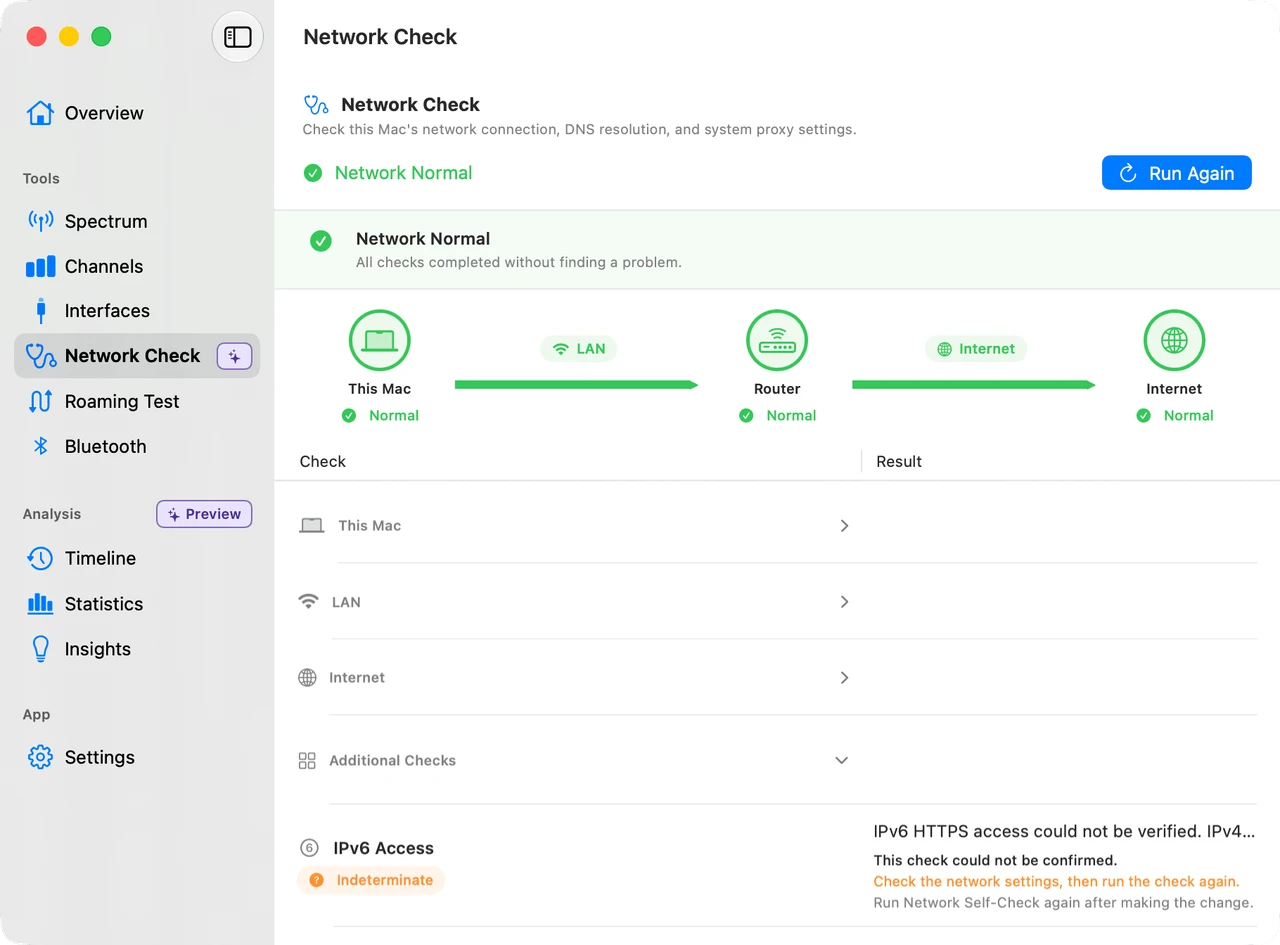
WiFi Lens Network Self-Check showing staged diagnostics for this Mac, LAN, and Internet
The short answer

AirPort Utility managed Apple base-station hardware. WiFi Lens is for modern Wi-Fi analysis and troubleshooting on a Mac. It does not cover AirPort hardware administration, but it can take over the visibility, diagnostics, roaming, and history part of the workflow.

Apple’s support status

What happened to AirPort Utility?

Apple says AirPort Utility has been discontinued. It was used to configure and update AirPort Time Capsule, AirPort Extreme Base Station, and AirPort Express Base Station.

macOS 26 is the last officially supported macOS version. Apple also says upgrading to macOS 27 or later does not remove an existing installation. All AirPort hardware and software products are now discontinued.

Read Apple Support’s availability and compatibility note ↗
Define the replacement

What are you actually trying to replace?

The right answer depends on whether your task is still about Apple hardware administration or about understanding the Wi-Fi your Mac is using.

AirPort hardware Keep using Apple’s guidance

I still manage AirPort hardware

WiFi Lens is not a replacement for AirPort hardware administration. If the task is base-station configuration, Apple’s support documentation remains the relevant source.

  • Configure AirPort Extreme or AirPort Express
  • Manage Time Capsule and AirPort topology
  • Apply AirPort firmware updates
See Apple’s AirPort support status ↗
Modern macOS workflow WiFi Lens

I need Wi-Fi analysis on my Mac

WiFi Lens can take over the diagnostic side of the job, whether the network uses an Apple router, a third-party router, or a mix of access points.

  • Nearby Wi-Fi visibility, spectrum, and channel congestion
  • Connection, LAN, DNS, proxy/VPN, and Internet diagnostics
  • Roaming validation and historical network events
Explore WiFi Lens features →
Responsibility comparison

What AirPort Utility did — and what WiFi Lens does

These tools belong to different generations and responsibilities. WiFi Lens does not administer AirPort hardware.

TaskAirPort UtilityWiFi Lens
Configure AirPort base stationsYesNo
Update AirPort firmwareYesNo
Manage AirPort network topologyYesNo
Inspect nearby Wi-Fi environmentNot its primary purposeYes
Inspect channel congestionNot its primary purposeYes
Channel recommendationsNot stated in the support noteYes
Connection self-checkNot its primary purposeYes
LAN / DNS / proxy / VPN diagnosticsNot its primary purposeYes
Roaming validationNot its primary purposeYes
Historical network eventsNot its primary purposePro
Actively maintained modern macOS toolOfficial support endedYes

About this page. AirPort Utility support status was checked against Apple Support on 2026-09-26. Apple and AirPort Utility are not affiliated with WiFi Lens or Shiina Labs. Support status and product capabilities can change.

A modern Mac workflow

A modern Wi-Fi troubleshooting workflow on Mac

Move from visibility to evidence in four steps. WiFi Lens keeps wireless conditions, connection checks, roaming behavior, and history in one local-first macOS app.

01 · SeeFind nearby networks, inspect spectrum, and see channel pressure.
02 · DiagnoseCheck this Mac, LAN, DNS, gateway, proxy, VPN, and Internet reachability.
03 · VerifyRun a roaming test to validate AP handoff and observe signal behavior.
04 · ReviewUse Timeline, Statistics, and Insights in Pro to investigate what happened over time.
WiFi Lens Network Self-Check showing staged diagnostics for this Mac, LAN, and Internet
FAQ

AirPort Utility and WiFi Lens on Mac

Is AirPort Utility discontinued?
Yes. Apple says it has discontinued AirPort Utility, and that all AirPort hardware and software products are now discontinued. macOS 26, iOS 26, and iPadOS 26 are the last operating systems to officially support it.
Does AirPort Utility still work on macOS 27?
Apple says upgrading to macOS 27 or later does not remove an existing AirPort Utility installation, but macOS 26 is the last officially supported macOS version for AirPort Utility.
Can WiFi Lens configure an AirPort Extreme or Time Capsule?
No. WiFi Lens does not configure AirPort Extreme, AirPort Express, or Time Capsule hardware, manage AirPort topology, or update AirPort firmware. It is a modern Mac Wi-Fi analysis and diagnostics tool.
What can I use instead of AirPort Utility for Wi-Fi analysis?
For nearby Wi-Fi visibility, spectrum and channel analysis, connection checks, roaming validation, and historical network investigation on a Mac, WiFi Lens is a maintained macOS option. It does not replace AirPort hardware administration.
Does WiFi Lens work with non-Apple routers?
Yes. WiFi Lens analyzes the Wi-Fi environment and the connection used by your Mac, so its visibility and diagnostic workflow is not limited to Apple routers. It does not administer router hardware.