NetSpot on a Mac?

Looking for a NetSpot alternative on Mac?

This page refers to NetSpot at netspotapp.com, the Wi-Fi analysis and site-survey tool. NetSpot is a real macOS app with a free plan and a paid Pro edition. WiFi Lens does a narrower job: it turns your Mac into a native Wi-Fi analysis and diagnostics workstation, and its OSS edition is free and open source.

macOS 14+ · Native · No account · Open-source edition

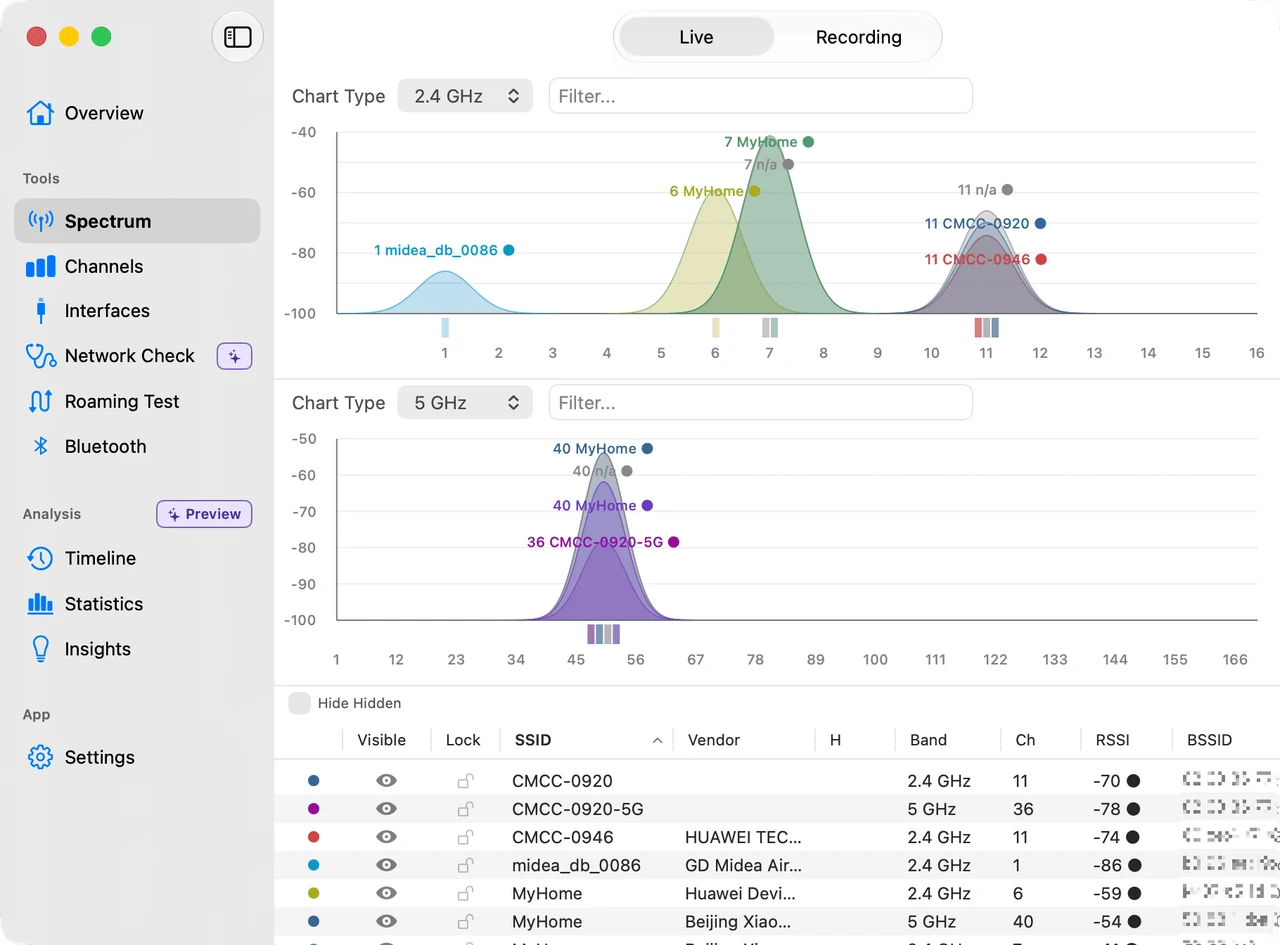
WiFi Lens spectrum scanner showing nearby Wi-Fi networks and channel congestion on macOS
The short answer

If you want free and open source, WiFi Lens has an OSS edition with public source. If you want floor-plan heatmaps and multi-platform site surveys, NetSpot is the better fit — WiFi Lens does not do that. The two overlap on Wi-Fi visibility, not on the workflow.

Same problem, different workflow

Choose by what you are trying to learn

Both tools make Wi-Fi easier to see, but they answer different questions.

macOS · Windows · Android · iOS NetSpot

Map coverage across a space

Best when the question is where exactly the signal is weak, and you want a survey you can walk through and keep.

  • Interactive heatmaps and reports
  • Multi-floor plans with wall materials
  • Predictive planning before a survey
Visit the NetSpot website ↗
macOS WiFi Lens

Diagnose the network from your Mac

Best when you want to understand channel congestion, connection health, network failures, or roaming from the Mac you are actually using.

  • 2.4 / 5 / 6 GHz spectrum and channel analysis
  • Connection, LAN, DNS, proxy, VPN, and Internet self-checks
  • Roaming tests with saved sessions and history
Explore WiFi Lens features →
Quick comparison

NetSpot vs. WiFi Lens

Only the differences that matter when you are picking one for a Mac.

Need NetSpot WiFi Lens
Platforms macOS, Windows, Android, iOS macOS 14+
Free edition Free plan available; Pro is a paid edition OSS edition free, with public source
Source code Proprietary Public for the OSS edition
Floor-plan heatmaps Yes — multi-floor surveys with wall materials Not the focus
Channel visibility Channel graphs and network lists Tri-band spectrum with channel scoring and recommendations
Connection troubleshooting On macOS and Windows Connection dashboard plus staged this-Mac / LAN / Internet checks

About this comparison. NetSpot details come from netspotapp.com and were checked on 2026-09-13: the site lists macOS, Windows, Android, and iOS support, survey and heatmap features, a free plan, and a paid Pro edition. No prices are quoted here because the product site does not state them on the page this was checked against. NetSpot is independent and is not affiliated with WiFi Lens or Shiina Labs. Product capabilities and pricing can change — check NetSpot's own site before deciding.

Which one should you use?
Choose NetSpot if…

You need a spatial survey.

If the question is where coverage is weak across a building, and you want heatmaps, floor plans, and reports on more than one platform, NetSpot is built for that.

Choose WiFi Lens if…

You need to understand what your Mac is experiencing.

If the question is why this connection is slow, crowded, unstable, or roaming badly, WiFi Lens gives you the desktop diagnostics to investigate it directly — free and open source.

Download for macOS
FAQ

NetSpot and WiFi Lens on Mac

Is there a free NetSpot alternative for Mac?
WiFi Lens has a free, open-source edition — WiFi Lens OSS is published on GitHub. It is not a site-survey tool, so it does not replace NetSpot floor-plan heatmaps. For live channel analysis and connection diagnostics on a Mac it needs no account and no payment.
Does WiFi Lens do Wi-Fi heatmaps like NetSpot?
No. WiFi Lens does not produce floor-plan or AR coverage heatmaps. If a spatial survey of a building is the goal, NetSpot is the better fit.
Is WiFi Lens a replacement for NetSpot?
Only for the part of the job that is live analysis and troubleshooting on macOS. NetSpot covers more platforms and adds floor-plan surveys; WiFi Lens is narrower and focuses on the Mac you are using.
Is WiFi Lens open source?
The OSS edition is, and its source is public. Pro is a separate paid edition that adds the menu bar status monitor, Timeline event history, Statistics, and Insights.
Does WiFi Lens run on Windows?
No. WiFi Lens is macOS 14 and later only.
Native macOS Wi-Fi analysis

See what your Mac sees.

Inspect the air, diagnose the connection, and verify what changes when you move.