Scan visible Wi-Fi networks
See nearby networks on supported 2.4, 5, and 6 GHz bands. Availability depends on your Mac hardware and macOS.
Analyze the networks, channels, and signal strength visible to your Mac. WiFi Lens is a native macOS Wi-Fi analyzer, with a free open-source OSS edition and a separate Pro edition.
Need a focused channel comparison? Explore the Wi-Fi Channel Analyzer →
Comparing WiFi Explorer with a modern Mac workflow? See the alternative page →
Moving on from AirPort Utility? See the Mac Wi-Fi analysis alternative →
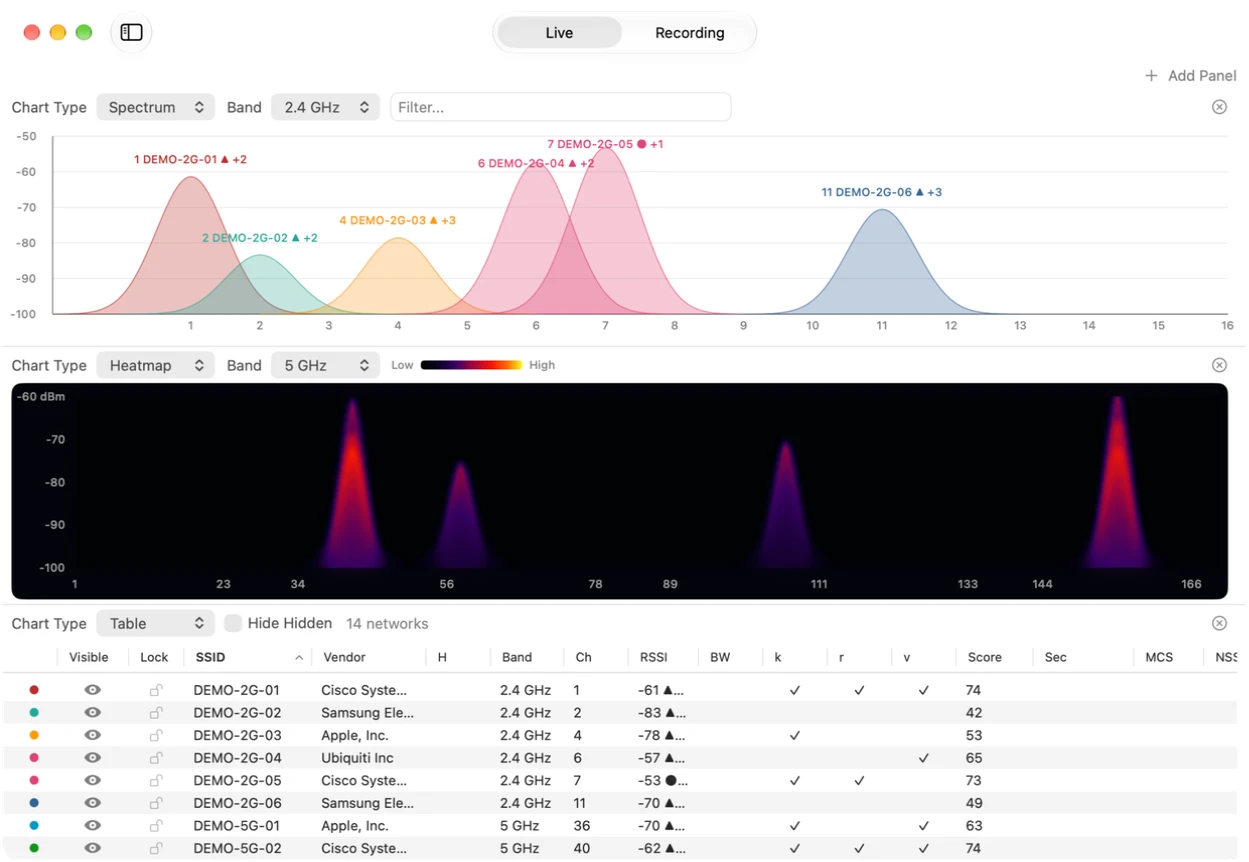
See nearby networks on supported 2.4, 5, and 6 GHz bands. Availability depends on your Mac hardware and macOS.
Watch each network's signal strength update as you move around.
See at a glance which channels are crowded and which are clear.
Every nearby access point in one sortable table.
Observe which access point the Mac running WiFi Lens connects to as you move.
"Wi-Fi feels slow"
Channel congestion is often the cause. Check the networks and channels around you with WiFi Lens.
"Which channel should I use?"
Compare how crowded each channel is in the spectrum scanner, then pick a cleaner one.
"I want to check 5 GHz or 6 GHz"
Check supported bands on your Mac and see nearby networks and channel use where macOS provides that information.
Built on Apple's CoreWLAN framework.
Runs on minimal resources.
WiFi Lens OSS is published under the Apache 2.0 license.
Scans are processed on your Mac; optional integrations and website analytics have separate data handling.